MU Immortal captures the essence of classic MMORPG gameplay that longtime fans cherish—level grinding, stat optimization, and crafting the ultimate character. While the game is optimized for mobile devices, playing on PC with BlueStacks unlocks powerful tools that enhance every aspect of your journey. From intuitive control customization to managing multiple accounts simultaneously, these features go beyond basic convenience—they empower you to play more efficiently and effectively.
In this guide, we’ll explore key BlueStacks features and how they seamlessly integrate with MU Immortal’s core mechanics. Whether you're beginning your adventure or deep into offline farming, these tools can significantly boost your progress.
Customize Controls and Shortcuts with the Keymapping Tool
The Keymapping Tool is one of BlueStacks’ most valuable features, especially in a skill-intensive game like MU Immortal where quick access to abilities, potions, and menus is crucial. While the game is built for touchscreens, switching to a keyboard and mouse setup delivers greater precision and faster response times.
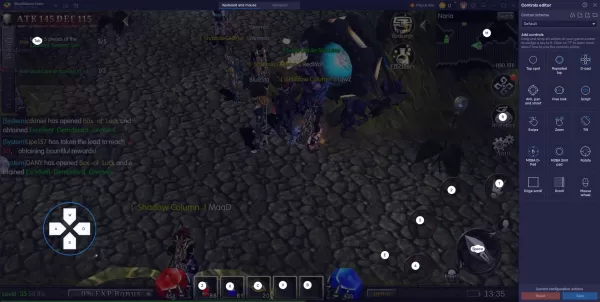
This becomes even more advantageous when running multiple accounts for offline farming. With keymapping, you can standardize controls across instances, ensuring consistent performance and minimizing errors before leaving your characters to farm unattended. Synchronizing setups helps maintain balanced progression and maximizes resource output across all accounts.
MU Immortal already simplifies gameplay with auto-play and offline progression systems, but there’s always room to optimize. By playing on PC with BlueStacks, you gain access to advanced tools that align perfectly with the game’s grind-heavy design and long-term progression loops.
If you’re currently playing MU Immortal or planning to dive in, don’t limit yourself to mobile constraints. [ttpp] Download BlueStacks today and experience a smoother, faster, and fully customizable way to play on PC. Spend less time managing routines and more time mastering your character’s journey.