


 Download
 Use the Bring & T update app to upgrade your Digital Key software to the latest version.
Use the Bring & T update app to upgrade your Digital Key software to the latest version.
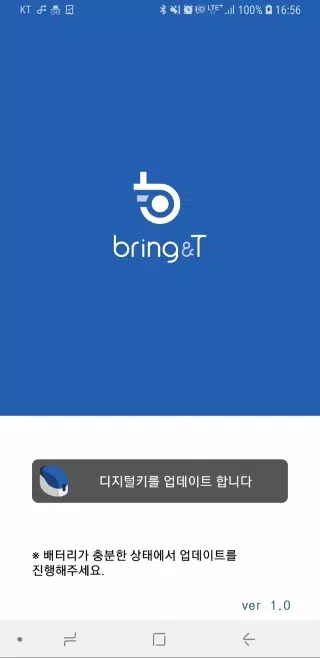
1. Launch the BringAnti update application.
2. Tap “Update digital key” at the bottom of the screen.
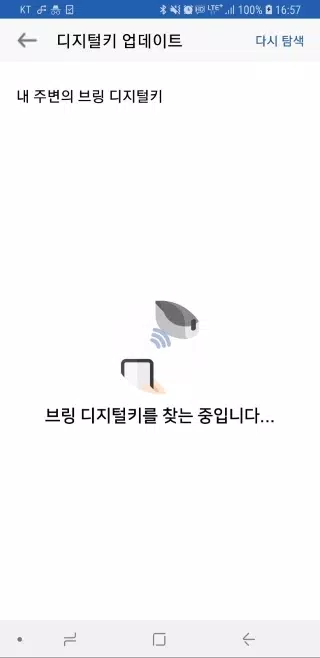
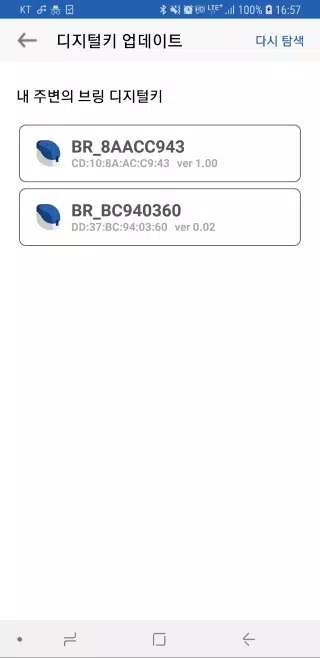
3. Choose the digital key “BR_xxxxxxxx” from the list.
If the digital key is not visible, click the [Search again] button to rescan.
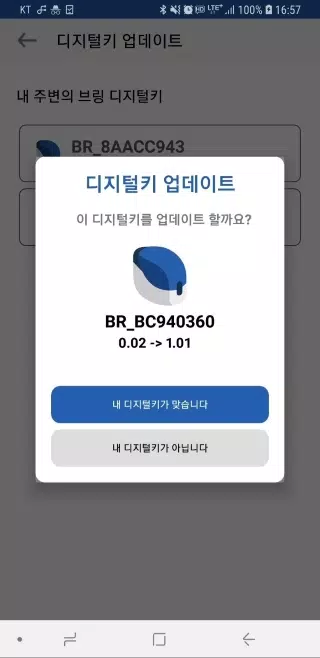
4. Once selected, both the current software version and the available update version are displayed.
5. Press “Your device is correct” and the digital key's LED will flash purple for 10 seconds.
Briefly press the digital key's button for about 0.5 seconds during this time.
6. After a moment, the LED changes from purple to blue, indicating a successful software update.
7. Once the update finishes, tap “Close” to exit the application.
8. Keep the digital key near your device during the update process, as it occurs wirelessly.
9. The update cannot be interrupted once started (it takes approximately 2 to 3 minutes), so ensure your device has adequate battery.
10. If the update stops or an error appears, close and restart the application.
11. Software updates are only available for digital keys that have been registered.
Unregistered digital keys do not support software updates.



- Switch 2 Stock Shortage Reportedly Ending 1 weeks ago
- World of Goo 2 Brings Physics Puzzles to Mobile 1 weeks ago
- Harukanaru Toki no Naka de: Ryuuguu no Miko is coming to iOS and Android this winter 1 weeks ago
- The Thunderbolts* 4K Steelbook Is Finally Up for Preorder, and It Features Both Titles 1 weeks ago
- Hoora turns mobile gaming into a TikTok-style scroll of endless minigames 1 weeks ago
- Duet Night Abyss Cuts Gacha, Boosts Players & Devs 2 weeks ago
-

Lifestyle / 24.4.1 / by Calisteniapp, S.L. / 69.34M
Download -

Productivity / v1.0 / by xifa console / 2.95M
Download -

Lifestyle / 0.105 / by Veicoli Srl / 4.80M
Download -

Personalization / 1.3.2 / 229.15M
Download -

Tools / 2.2.8 / by Gspace Team / 15 MB
Download -

Communication / 2.0.0.24 / 59.72M
Download


-
 The 10 Best Teams in Marvel Strike Force (2025)
-
 Square Enix Creates New Policy To Protect Employees From Toxic Fans
-
 Celebrate 7th Anniversary: Solve the Mystery in Harry Potter: Hogwarts Mystery!
-
 How To Fix Marvel Rivals Compiling Shaders Slow on Launch
-
 It seems we can forget about explicit sex scenes in inZOI
-
 "ESO Expansions & DLC: Complete Order Guide"