


TigerJP88
Catégorie : ActionVersion: 1.0.272
Taille:43.00MSystème d'exploitation : Android 5.1 or later
 Télécharger
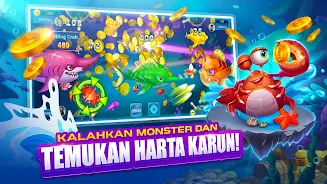
 Plongez dans le monde captivant de TigerJP88, où vous vous lancerez dans une aventure de chasse au poisson exaltante pleine de couleurs vives et d'action de tir explosive. Rassemblez votre équipage de quatre personnes et engagez-vous dans des batailles palpitantes contre de redoutables monstres marins, en profitant d'effets visuels spectaculaires directement sur l'écran de votre téléphone portable. Des récompenses de connexion quotidiennes, des défis de boss uniques et une pluie constante de pièces et de prix vous attendent dans ce jeu captivant. Téléchargez TigerJP88 maintenant pour libérer le chasseur de poissons sauvages qui sommeille en vous, connectez-vous avec des amis du monde entier et embarquez pour un voyage aquatique inoubliable.
Remarque : Ce jeu est uniquement destiné à des fins récréatives. Le jeu est gratuit et aucun prix de valeur ne peut être gagné. Les joueurs doivent être conscients du contenu violent du jeu et tenir compte de son âge. Comme pour toute interaction en ligne, soyez prudent lorsque vous vous connectez avec d’autres personnes et ne partagez jamais d’informations personnelles.
Compatibilité des langues et des appareils :
TigerJP88 est disponible en plusieurs langues, dont l'anglais, le chinois, l'espagnol, le français et l'allemand, garantissant une expérience de jeu mondiale. L'application est compatible avec une large gamme d'appareils iOS et Android, y compris les smartphones et tablettes de marques populaires comme Apple, Samsung, Huawei, Xiaomi, etc.
Caractéristiques:
- Expérience visuelle immersive : Découvrez un monde sous-marin visuellement époustouflant avec des scènes captivantes, des effets spéciaux spectaculaires, des commandes fluides et un gameplay intuitif.
- Bonus et récompenses quotidiens : Gagnez des récompenses et des bonus quotidiens, notamment de la monnaie du jeu, des bonus et des objets à débloquer, pour améliorer votre gameplay.
- Action de tir explosif : Participez à une action de tir rapide, en ciblant et en chassant diverses espèces de poissons. Visez avec précision et déclenchez un barrage de balles pour maximiser vos prises.
- Combattez des monstres marins et des rencontres de boss uniques : Participez à des batailles épiques avec des monstres marins et conquérez des rencontres de boss uniques, testez vos compétences et travail d'équipe.
- Conception simple : la conception simple mais attrayante de garantit une navigation attrayante et facile interface.TigerJP88
- Connectez-vous, discutez et conquérez : Connectez-vous avec des amis du monde entier, discutez, jouez ensemble, explorez le , partagez des réalisations, rivalisez pour obtenir des scores élevés et formez des alliances.Ocean Depths
Comment jouer :
- Téléchargez et installez
- depuis la boutique d'applications de votre appareil.TigerJP88 Lancez l'application et créez un profil de joueur.
- Explorez le monde sous-marin, acceptez des quêtes et participez batailles.
- Personnalisez les membres de votre équipage et équipez-les d'armes puissantes.
- Participez à des combats de boss difficiles pour gagner des récompenses et progrès.
- Connectez-vous avec des amis, rejoignez des alliances et participez à des tournois mondiaux.
Avantages et inconvénients :
Avantages :
- Des visuels époustouflants et des graphismes détaillés créent une expérience sous-marine immersive.
- Accessible à tous les niveaux de compétence.
- Les récompenses de connexion quotidiennes et les événements spéciaux offrent une progression et une excitation constantes.
- Les classements mondiaux et le gameplay coopératif favorisent la compétition et la communauté.
- Des mises à jour et améliorations régulières améliorent le jeu. expérience.
- Support multilingue.
Inconvénients :
- Les achats intégrés peuvent être coûteux ; la prudence est de mise.
- Interagir avec d'autres joueurs peut présenter des risques pour la vie privée et la sécurité.
FAQ :
- Puis-je jouer TigerJP88 hors ligne ? Non, une connexion Internet stable est requise pour les fonctionnalités multijoueurs.
- Y a-t-il une limite d'âge ? Non, mais la surveillance parentale est conseillée pour les jeunes joueurs.
- Puis-je modifier l'apparence de mon personnage et capacités ?Oui, des options de personnalisation sont disponibles au fur et à mesure de votre progression.
- Puis-je jouer sur plusieurs appareils ?Oui, votre progression sera synchronisée sur tous les appareils utilisant le même compte.
Conclusion :
TigerJP88 offre une expérience de chasse au poisson visuellement époustouflante et pleine d'action. Le monde sous-marin vibrant, l'action de tir explosive et les combats de boss épiques offrent un gameplay captivant. Des récompenses quotidiennes, une connectivité mondiale et des mises à jour régulières améliorent l'expérience globale. Téléchargez maintenant et plongez dans une aventure aquatique inoubliable !





Fun shooting game! The graphics are vibrant and the gameplay is addictive. Could use more levels and challenges.
Entretenido juego de disparos. Los gráficos son buenos, pero la jugabilidad es un poco repetitiva.
Excellent jeu de tir! Les graphismes sont magnifiques et le gameplay est très prenant. Un must-have!


Le PMGC 2025 de PUBG Mobile entre en phase de groupes, les neuf dernières places pour la finale se dessinant

Tears of Themis : La Ballade des Dunes, avec l'ajout de cartes MR
- Cats & Soup : une nouvelle mise à jour à thème nautique pour l'été Il y a 1 semaines
- Esprit de Feu contre Fée des Mers : Qui Domine Cookie Run Kingdom ? Il y a 1 semaines
- Orlando Bloom veut voir Legolas dans « Le Seigneur des anneaux : La Chasse à Gollum », mais l’IA devra intervenir Il y a 1 semaines
- Date et heure de sortie de Black Myth : Zhong Kui Il y a 2 semaines
- Atelier Yumia révèle la date de lancement Il y a 2 semaines
- Date de sortie officielle et gameplay d'Anime Auto Chess Il y a 2 semaines
- Découvrez les offres incroyables sur les ordinateurs portables Legion Gaming pendant la vente du Jour des travailleurs de Lenovo Il y a 2 semaines
- Le Mégalopolis de Coppola donne naissance à une bande dessinée dérivée Il y a 2 semaines
- Économisez 20 % sur le Google Streamer 4K (le meilleur appareil de streaming Android sous 100 $) Il y a 2 semaines
-

Puzzle / 2.24.0 / by Guru Puzzle Game / 60.04M
Télécharger -

Action / V13 / by Jump Force Mugen INC / 636 MB
Télécharger -

Puzzle / 2.12.1 / by Webelinx Games / 131.20M
Télécharger -

Carte / 1.0 / by Stratul state apps / 3.00M
Télécharger -

Occasionnel / v0.1.12 / by Lionessentertainment / 830.30M
Télécharger -

Occasionnel / v1.0.0 / by bitawastaken / 72.41M
Télécharger -

Occasionnel / v1.51 / by Shikstoo Games / 163.71M
Télécharger -

Occasionnel / v1.0 / by Bubbles and Sisters / 889.54M
Télécharger
-
 Les 10 meilleures équipes de Marvel Strike Force (2025)
-
 Square Enix crée une nouvelle politique pour protéger les employés des fans toxiques
-
 Comment réparer les concurrents de Marvel en compilant les shaders lent au lancement
-
 Célébrez le 7e anniversaire: Résolvez le mystère de Harry Potter: Poudlard Mystery!
-
 Il semble que nous puissions oublier les scènes de sexe explicites à Inzoi
-
 "ESO Expansions & DLC: Guide complet de commande"