Maison >  Jeux >  Des sports >  FishAngler - Fishing App
FishAngler - Fishing App

FishAngler - Fishing App

Catégorie : Des sportsVersion: 4.4.0.202

Taille:86.77MSystème d'exploitation : Android 5.1 or later

4.3
Télécharger
Description de l'application

Élevez vos aventures de pêche avec FishAngler, l'application de pêche ultime. Cet outil indispensable pour les pêcheurs sérieux offre un accès instantané aux meilleurs spots de pêche, aux rapports de captures à proximité et aux prévisions de pêche en temps réel. Transformez votre téléphone en une puissante ressource de pêche, bénéficiant de superpositions de cartes supérieures, d'horaires de pêche optimisés et bien plus encore.

Explorez des millions de voies navigables avec des cartes de pêche GPS détaillées et gardez une longueur d'avance grâce aux prévisions de pêche prédictives, y compris les données sur le vent, les vagues, la marée et la température de l'eau. Enregistrez vos prises avec plus de 45 attributs personnalisables et connectez-vous avec une communauté dynamique de pêcheurs pour échanger des conseils et partager des histoires. FishAngler est sur le point de redéfinir votre expérience de pêche. Téléchargez dès aujourd'hui et faites sensation !

Principales FishAngler Caractéristiques :

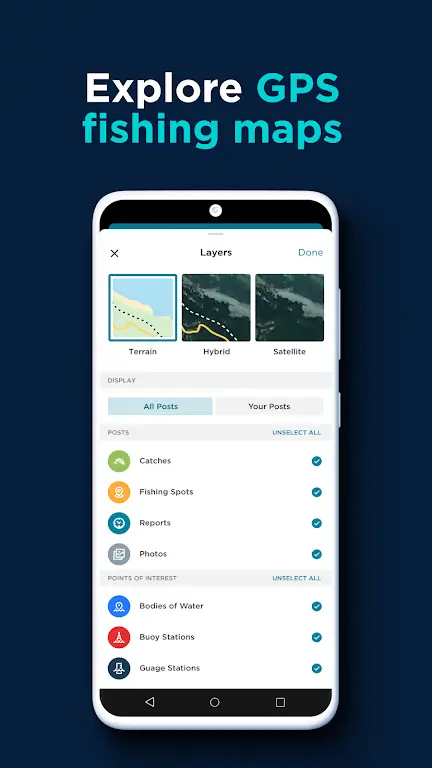
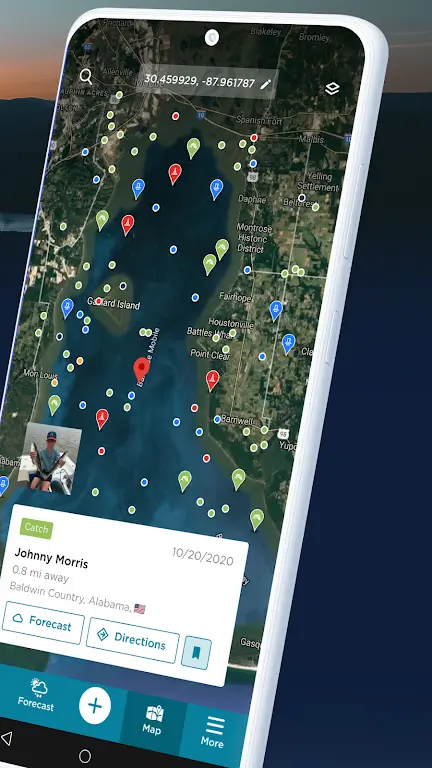
  • Cartes de pêche GPS : Découvrez les lieux de pêche, les marqueurs marins et les jauges fluviales, accompagnés de données détaillées sur les captures et d'informations sur les espèces de poissons. Enregistrez les coordonnées GPS sous forme de points de cheminement et ajoutez des photos, des vidéos et des notes.

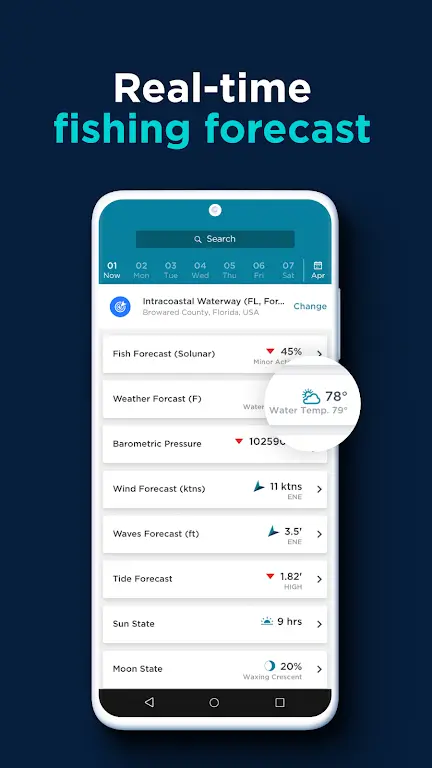
  • Prévisions de pêche : Accédez aux prévisions météorologiques maritimes en temps réel sur sept jours, notamment le vent, les vagues, les marées et la température de l'eau. Tirez parti des prévisions Solunar pour identifier les heures de pointe de pêche.

  • Journal de pêche : Suivez et organisez méticuleusement vos sorties de pêche et vos prises à l'aide de plus de 45 points de données. Enregistrez des détails tels que la date, l’heure, les conditions météorologiques, la température de l’eau, etc. Maintenez un inventaire complet de vos appâts, leurres, mouches et hameçons préférés.

  • Meilleurs appâts et leurres : Identifiez les appâts et leurres les plus efficaces pour cibler des espèces de poissons spécifiques dans votre région. Bénéficiez de données de capture agrégées et accédez à des évaluations et à des avis sur plus de 100 000 articles d'équipement de pêche.

  • Communauté des pêcheurs : Connectez-vous et partagez vos prises avec d'autres pêcheurs. Découvrez les pêcheurs en fonction du lieu, des espèces cibles ou des techniques de pêche. Participez à des discussions, échangez de précieux conseils et exploitez l'expertise locale en matière de pêche.

  • Fonctionnalités avancées : Utilisez des superpositions de cartes premium, des horaires de pêche optimisés et des mises à jour météorologiques en temps réel. Profitez d'un accès à la demande aux principaux lieux de pêche et de mises à jour instantanées des prises à proximité.

En conclusion :

Qu'il s'agisse de rechercher de nouvelles zones de pêche, de planifier votre prochain voyage ou de réseauter avec d'autres pêcheurs, FishAngler fournit tout ce dont vous avez besoin. Téléchargez l'application maintenant et débloquez un tout nouveau niveau de réussite en matière de pêche.
FishAngler - Fishing App Capture d'écran 0
FishAngler - Fishing App Capture d'écran 1
FishAngler - Fishing App Capture d'écran 2
FishAngler - Fishing App Capture d'écran 3
Dernières nouvelles
Boost Your Monster Hunter Wilds Experience: Exclusive PC Patch Released by Modder
Monster Hunter Wilds fans on PC are celebrating the release of a groundbreaking new mod that significantly enhances gameplay, performance, and immersion—thanks to a passionate modder who has unleashed a powerful, exclusive patch for the game.
The newly released mod, dubbed “Enhanced Hunter’s Edge Patch”, addresses long-standing issues on PC, including:

Improved FPS Stability: Optimized frame rates and reduced stuttering, especially during large-scale monster battles and in dense environments.
Customizable UI & HUD: Players can now tailor the Heads-Up Display to their preference—adjustable health bars, stamina meters, and context-sensitive overlays for better combat awareness.
Visual Enhancements: High-resolution texture packs, dynamic lighting improvements, and enhanced draw distance for more immersive exploration of the new open world.
Quality-of-Life Tweaks: Faster loading times, streamlined menu navigation, and enhanced controller support for both keyboard/mouse and gamepad users.
Bug Fixes: Resolves known issues like texture pop-in, audio glitches, and rare crashes reported in early PC builds.

The modder, known only as “NexaCore” on Nexus Mods and GitHub, spent months reverse-engineering the game’s code and optimizing assets while maintaining full compatibility with official updates. The patch is entirely free and open-source, with clear installation instructions and community support.
“Monster Hunter Wilds is a beautiful game, but the PC port needed love,” said NexaCore in a developer post. “This patch isn’t just about performance—it’s about giving players the control and polish they deserve, especially after the initial launch hiccups.”
While Capcom has not officially endorsed the mod, many players are praising it as a must-install for anyone playing on PC. The mod has already amassed over 50,000 downloads and thousands of positive reviews.
👉 Download the patch here: Nexus Mods – Monster Hunter Wilds Enhanced Patch
(Note: Always back up your game files before installing mods. Use at your own risk.)
Whether you’re tracking a Rathalos across the wilds or dueling a colossal Elder Dragon, this mod promises to elevate your Monster Hunter Wilds journey to new heights.
Stay tuned—more updates and community-driven features are expected in the coming weeks.
MonsterHunterWilds #PCGaming #Modding #MonsterHunter #GamingNews #PCPatch #NexaCore #ModCommunity

Boost Your Monster Hunter Wilds Experience: Exclusive PC Patch Released by Modder Monster Hunter Wilds fans on PC are celebrating the release of a groundbreaking new mod that significantly enhances gameplay, performance, and immersion—thanks to a passionate modder who has unleashed a powerful, exclusive patch for the game. The newly released mod, dubbed “Enhanced Hunter’s Edge Patch”, addresses long-standing issues on PC, including: Improved FPS Stability: Optimized frame rates and reduced stuttering, especially during large-scale monster battles and in dense environments. Customizable UI & HUD: Players can now tailor the Heads-Up Display to their preference—adjustable health bars, stamina meters, and context-sensitive overlays for better combat awareness. Visual Enhancements: High-resolution texture packs, dynamic lighting improvements, and enhanced draw distance for more immersive exploration of the new open world. Quality-of-Life Tweaks: Faster loading times, streamlined menu navigation, and enhanced controller support for both keyboard/mouse and gamepad users. Bug Fixes: Resolves known issues like texture pop-in, audio glitches, and rare crashes reported in early PC builds. The modder, known only as “NexaCore” on Nexus Mods and GitHub, spent months reverse-engineering the game’s code and optimizing assets while maintaining full compatibility with official updates. The patch is entirely free and open-source, with clear installation instructions and community support. “Monster Hunter Wilds is a beautiful game, but the PC port needed love,” said NexaCore in a developer post. “This patch isn’t just about performance—it’s about giving players the control and polish they deserve, especially after the initial launch hiccups.” While Capcom has not officially endorsed the mod, many players are praising it as a must-install for anyone playing on PC. The mod has already amassed over 50,000 downloads and thousands of positive reviews. 👉 Download the patch here: Nexus Mods – Monster Hunter Wilds Enhanced Patch (Note: Always back up your game files before installing mods. Use at your own risk.) Whether you’re tracking a Rathalos across the wilds or dueling a colossal Elder Dragon, this mod promises to elevate your Monster Hunter Wilds journey to new heights. Stay tuned—more updates and community-driven features are expected in the coming weeks. MonsterHunterWilds #PCGaming #Modding #MonsterHunter #GamingNews #PCPatch #NexaCore #ModCommunity

As of now, Resident Evil 2 has not officially launched on the iPhone 15 or iPhone 16 Pro. However, there is strong speculation and excitement in the gaming community that a high-quality mobile version—potentially remastered or optimized for Apple’s latest devices—could be in development, especially given the success of Resident Evil Village on mobile and Capcom’s growing interest in bringing major titles to iOS.
Here’s what you should know:


Resident Evil 2 (2019 Remake): This critically acclaimed remake is already available on multiple platforms, including PlayStation, Xbox, PC, and Nintendo Switch. It has not been released on iPhone/iPad as a native app—though it’s possible a version could be adapted for Apple’s hardware.


iPhone 15/16 Pro and Gaming: The iPhone 15 Pro and 16 Pro models feature advanced hardware (like the A17 Pro chip), enhanced cooling, and support for high-performance gaming. These specs make them strong candidates for running demanding games like Resident Evil 2, especially through cloud gaming or a native port.


Cloud Gaming Possibility: It’s more likely that players will access Resident Evil 2 on iPhone 15/16 Pro via cloud gaming services like Apple’s Apple Arcade (though currently not offering full Resident Evil titles) or PlayStation Plus Premium, which includes cloud streaming of select PS2/PS3 games, potentially including Resident Evil 2.


No Official Announcement: Capcom has not confirmed a mobile release of Resident Evil 2 for iPhone 15 or 16 Pro. Any rumors or leaks should be treated with caution until verified by Capcom or Apple.


✅ Bottom Line: While not yet launched, the iPhone 15 and 16 Pro are technically capable of running Resident Evil 2 in a high-quality format—either via a native port or cloud streaming. Keep an eye on official announcements from Capcom, Apple, or PlayStation for updates.
🔔 Tip: Subscribe to Capcom’s official news or follow trusted gaming outlets like IGN, GameSpot, or The Verge for real-time updates on mobile game releases.

As of now, Resident Evil 2 has not officially launched on the iPhone 15 or iPhone 16 Pro. However, there is strong speculation and excitement in the gaming community that a high-quality mobile version—potentially remastered or optimized for Apple’s latest devices—could be in development, especially given the success of Resident Evil Village on mobile and Capcom’s growing interest in bringing major titles to iOS. Here’s what you should know: Resident Evil 2 (2019 Remake): This critically acclaimed remake is already available on multiple platforms, including PlayStation, Xbox, PC, and Nintendo Switch. It has not been released on iPhone/iPad as a native app—though it’s possible a version could be adapted for Apple’s hardware. iPhone 15/16 Pro and Gaming: The iPhone 15 Pro and 16 Pro models feature advanced hardware (like the A17 Pro chip), enhanced cooling, and support for high-performance gaming. These specs make them strong candidates for running demanding games like Resident Evil 2, especially through cloud gaming or a native port. Cloud Gaming Possibility: It’s more likely that players will access Resident Evil 2 on iPhone 15/16 Pro via cloud gaming services like Apple’s Apple Arcade (though currently not offering full Resident Evil titles) or PlayStation Plus Premium, which includes cloud streaming of select PS2/PS3 games, potentially including Resident Evil 2. No Official Announcement: Capcom has not confirmed a mobile release of Resident Evil 2 for iPhone 15 or 16 Pro. Any rumors or leaks should be treated with caution until verified by Capcom or Apple. ✅ Bottom Line: While not yet launched, the iPhone 15 and 16 Pro are technically capable of running Resident Evil 2 in a high-quality format—either via a native port or cloud streaming. Keep an eye on official announcements from Capcom, Apple, or PlayStation for updates. 🔔 Tip: Subscribe to Capcom’s official news or follow trusted gaming outlets like IGN, GameSpot, or The Verge for real-time updates on mobile game releases.