Heim >  Apps >  Kommunikation >  Kaomoji Japanese Emojis Smiley
Kaomoji Japanese Emojis Smiley

Kaomoji Japanese Emojis Smiley

Kategorie : KommunikationVersion: 2.0.7

Größe:24.00MBetriebssystem : Android 5.1 or later

Entwickler:FaitAuJapon.com

4.5
Herunterladen
Anwendungsbeschreibung
Verbessern Sie Ihre Kommunikation mit Kaomojis – der ultimativen Sammlung japanischer Emojis, Emoticons und Smileys! Fügen Sie diese entzückenden Charaktere ganz einfach durch einfaches Tippen zu Ihren Nachrichten, E-Mails und Social-Media-Beiträgen hinzu. Teilen Sie sie direkt in Ihren Lieblings-Apps! Von fröhlichen Grüßen über ausdrucksstarke Stimmungen bis hin zu süßen Tieren haben wir für jede Situation ein Kaomoji. Erstellen und speichern Sie Ihre eigenen personalisierten Kaomoji-Listen und seien Sie beruhigt, weil Sie wissen, dass Ihre Kreationen sicher in der Cloud gesichert sind. Wir fügen ständig neue Funktionen hinzu, also teilen Sie uns Ihr Feedback und Ihre Vorschläge mit! Laden Sie Kaomojis noch heute herunter und verleihen Sie Ihren Gesprächen etwas Spaß und Persönlichkeit.

Highlights der Kaomoji-App:

  • Umfassende Kaomoji-Bibliothek: Greifen Sie auf Tausende japanische Emojis, Emoticons und Smileys zu – alle bequem kategorisiert.

  • Müheloses Teilen: Betten Sie Kaomojis mit einem einzigen Tastendruck sofort in jede Nachricht oder jeden Beitrag ein und teilen Sie sie direkt mit allen Ihren Apps.

  • One-Tap-Kopieren:Kopieren Sie Ihre Lieblings-Kaomojis in Ihre Zwischenablage, um sie nahtlos einzufügen.

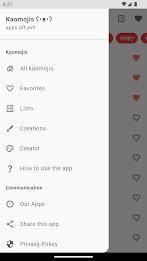
  • Organisierte Kategorien: Finden Sie schnell das perfekte Kaomoji mithilfe unserer gut organisierten Kategorien.

  • Personalisierte Sammlungen: Erstellen Sie benutzerdefinierte Listen Ihrer Lieblings-Kaomojis für einen einfachen Zugriff.

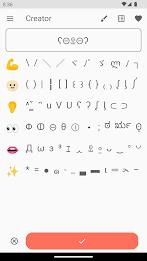
  • Benutzerdefinierte Kaomoji-Erstellung: Lassen Sie Ihrer Kreativität freien Lauf und entwerfen Sie Ihre eigenen einzigartigen Kaomojis, mit Cloud-Backup zur sicheren Aufbewahrung.

Kurz gesagt:

Drücken Sie sich kreativ mit der Kraft von Kaomojis aus! Diese App bietet eine unterhaltsame und ansprechende Art der Kommunikation und bietet eine umfangreiche Bibliothek sowie einfache Freigabe- und Personalisierungsoptionen. Laden Sie es jetzt herunter und erleben Sie eine ganz neue Ebene der ausdrucksstarken Kommunikation!
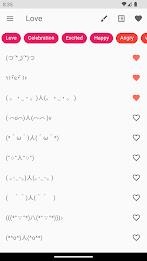
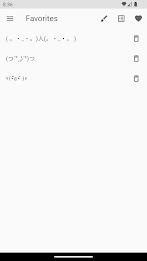
Kaomoji Japanese Emojis Smiley Screenshot 0
Kaomoji Japanese Emojis Smiley Screenshot 1
Kaomoji Japanese Emojis Smiley Screenshot 2
Kaomoji Japanese Emojis Smiley Screenshot 3
Rezensionen Kommentare posten
Neueste Nachrichten
Boost Your Monster Hunter Wilds Experience: Exclusive PC Patch Released by Modder
Fans of Monster Hunter Wilds on PC have reason to celebrate — a highly anticipated, fan-made patch has been officially released by a dedicated modder, promising to enhance gameplay, improve performance, and unlock new features not found in the base game.
The unofficial patch, developed by a well-known modder known in the community as “HuntMaster_X,” addresses several long-standing issues reported by PC players since the game's launch. Key improvements include:

Performance Optimization: Reduced frame drops and stuttering, especially during large monster battles and intense environmental events.
Enhanced Graphics Settings: Added support for higher resolutions (up to 4K), customizable anti-aliasing, and improved texture streaming.
Quality-of-Life Tweaks: Faster loading times, reworked UI scaling for ultra-wide monitors, and improved controller support.
New Customization Options: Players can now adjust monster spawn rates, toggle weather effects, and modify hunter mobility for a more tailored experience.
Stability Fixes: Critical bug fixes for crash issues related to multiplayer sync and map transitions.

While the mod is not officially endorsed by Capcom, it has gained widespread praise across Reddit, Nexus Mods, and Monster Hunter fan forums. The modder has emphasized that the patch is fully compatible with the latest official update and does not require any game files to be altered, reducing the risk of account bans.
Important Note: As with all unofficial mods, users are advised to back up their game files and proceed at their own risk. The mod is currently only available for Windows 10/11 and requires the game to be installed via Steam or the Microsoft Store.
To download the patch, visit the official Nexus Mods page (link: nexusmods.com/monsterhunterwilds) or the modder’s verified Discord server.
Whether you're a seasoned hunter or new to the world of Monster Hunter Wilds, this exclusive PC patch could be the key to a smoother, more immersive experience.
Stay wild. Stay hunted. And stay modded. 🐉⚔️

Boost Your Monster Hunter Wilds Experience: Exclusive PC Patch Released by Modder Fans of Monster Hunter Wilds on PC have reason to celebrate — a highly anticipated, fan-made patch has been officially released by a dedicated modder, promising to enhance gameplay, improve performance, and unlock new features not found in the base game. The unofficial patch, developed by a well-known modder known in the community as “HuntMaster_X,” addresses several long-standing issues reported by PC players since the game's launch. Key improvements include: Performance Optimization: Reduced frame drops and stuttering, especially during large monster battles and intense environmental events. Enhanced Graphics Settings: Added support for higher resolutions (up to 4K), customizable anti-aliasing, and improved texture streaming. Quality-of-Life Tweaks: Faster loading times, reworked UI scaling for ultra-wide monitors, and improved controller support. New Customization Options: Players can now adjust monster spawn rates, toggle weather effects, and modify hunter mobility for a more tailored experience. Stability Fixes: Critical bug fixes for crash issues related to multiplayer sync and map transitions. While the mod is not officially endorsed by Capcom, it has gained widespread praise across Reddit, Nexus Mods, and Monster Hunter fan forums. The modder has emphasized that the patch is fully compatible with the latest official update and does not require any game files to be altered, reducing the risk of account bans. Important Note: As with all unofficial mods, users are advised to back up their game files and proceed at their own risk. The mod is currently only available for Windows 10/11 and requires the game to be installed via Steam or the Microsoft Store. To download the patch, visit the official Nexus Mods page (link: nexusmods.com/monsterhunterwilds) or the modder’s verified Discord server. Whether you're a seasoned hunter or new to the world of Monster Hunter Wilds, this exclusive PC patch could be the key to a smoother, more immersive experience. Stay wild. Stay hunted. And stay modded. 🐉⚔️

Resident Evil 2 erscheint für iPhone 15 und 16 Pro.

Resident Evil 2 erscheint für iPhone 15 und 16 Pro.