


Blur Face - Censor Image
Kategorie : FotografieVersion: v1.0.10
Größe:5.00MBetriebssystem : Android 5.1 or later
 Herunterladen
 BlurFace: Schützen Sie mühelos Ihre Privatsphäre mit KI-gestützter Gesichtsunschärfe
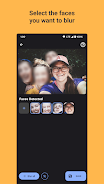
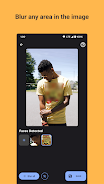
BlurFace ist eine benutzerfreundliche Anwendung, die für die schnelle und effiziente Unschärfe von Gesichtern auf Fotos entwickelt wurde. Mithilfe fortschrittlicher KI erkennt es automatisch Gesichter und bietet Unschärfe mit einem Klick für sofortige Privatsphäre. Über die automatische Erkennung hinaus erhalten Benutzer präzise Kontrolle mit manuellen Unschärfefunktionen und erweitern so den Schutz der Privatsphäre auf jeden Bildbereich. Bewahren Sie die Vertraulichkeit Ihrer persönlichen Daten problemlos.
Hauptmerkmale:
- Geschwindigkeit und Einfachheit: BlurFace optimiert den Prozess der Anonymisierung von Gesichtern und spart Ihnen wertvolle Zeit und Mühe.
- Automatisierte Gesichtserkennung: Intelligente KI-Technologie identifiziert Gesichter automatisch, sodass keine manuelle Auswahl mehr erforderlich ist.
- Sofortige Unschärfe: Ein einziger Klick zensiert Gesichter sofort und schützt so die Privatsphäre des Einzelnen.
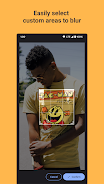
- Manuelle Unschärfesteuerung: Ergänzend zur automatischen Erkennung ermöglicht die manuelle Unschärfe die präzise Auswahl und Unschärfe jedes Bildbereichs.
- Erweiterter Datenschutz: Der Schutz von Gesichtern gewährleistet die Sicherheit persönlicher und sensibler Informationen und verhindert eine unerwünschte Identifizierung.
- Vollständige Datenschutzverwaltung: Manuelle Unschärfe bietet umfassende Kontrolle über den Grad der Anonymität Ihrer Fotos.
Laden Sie BlurFace noch heute herunter und schützen Sie die Privatsphäre Ihrer Fotos.



- Duet Night Abyss schneidet Gacha, stärkt Spieler & Entwickler Vor 1 Wochen
- Pedro Pascal nimmt Kritik an Besetzung von Reed Richards entgegen Vor 1 Wochen
- Vorregistrierung für das Jahrestags-Update von Brown Dust 2 eröffnet Vor 1 Wochen
- Play Together enthüllt massiven Dinosaur-Themenpark! Vor 1 Wochen
- „A Little to the Left“ startet die DLCs „Cupboards & Drawers“ und „Seeing Stars“ Vor 1 Wochen
- Monster Train ist jetzt auf Android verfügbar Vor 2 Wochen
-

Mode Lifestyle / 24.4.1 / by Calisteniapp, S.L. / 69.34M
Herunterladen -

Business Office / v1.0 / by xifa console / 2.95M
Herunterladen -

Mode Lifestyle / 0.105 / by Veicoli Srl / 4.80M
Herunterladen -

Werkzeuge / v1.1.9 / by nikiisoku / 141.53M
Herunterladen -

Personalisierung / 1.3.2 / 229.15M
Herunterladen -

Werkzeuge / 2.2.8 / by Gspace Team / 15 MB
Herunterladen -

Kommunikation / 2.0.0.24 / 59.72M
Herunterladen -

Mode Lifestyle / v1.0 / by MNA Team / 264.80M
Herunterladen
-
 Die 10 besten Teams in Marvel Strike Force (2025)
-
 Square Enix schafft eine neue Politik, um Mitarbeiter vor giftigen Fans zu schützen
-
 Feiern Sie das 7. Jubiläum: Lösen Sie das Geheimnis in Harry Potter: Hogwarts Mystery!
-
 So reparieren Sie Marvel -Rivalen, die Shader beim Start langsam zusammenstellen
-
 Es scheint, dass wir explizite Sexszenen in Inzoi vergessen können
-
 "ESO -Erweiterungen & DLC: Complete Order Guide"