>  アプリ >  おしゃれな生活 >  Kika Keyboard-AI Emojis、Themes
Kika Keyboard-AI Emojis、Themes

Kika Keyboard-AI Emojis、Themes

カテゴリー : おしゃれな生活バージョン: 6.7.0.7516

サイズ:34.50MOS : Android 5.1 or later

開発者:Kika AI Team

4.5
ダウンロード
アプリケーションの説明

Kikaキーボードで次のレベルのタイピングを体験してください-Ai emojis&Themes!この革新的なアプリを使用すると、これまでにないようにキーボードをパーソナライズできます。何千ものカラフルなテーマ、クールなフォント、面白い絵文字から選択して、ユニークに自分を表現してください。

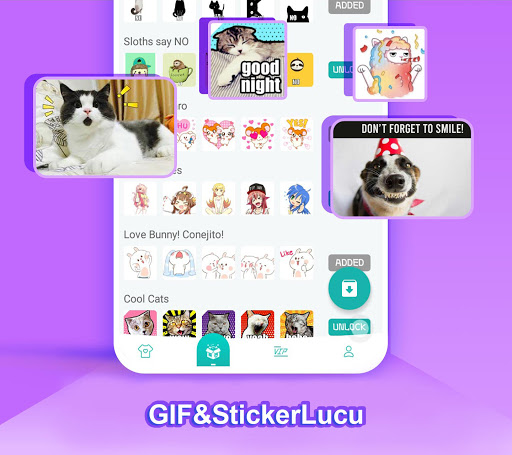
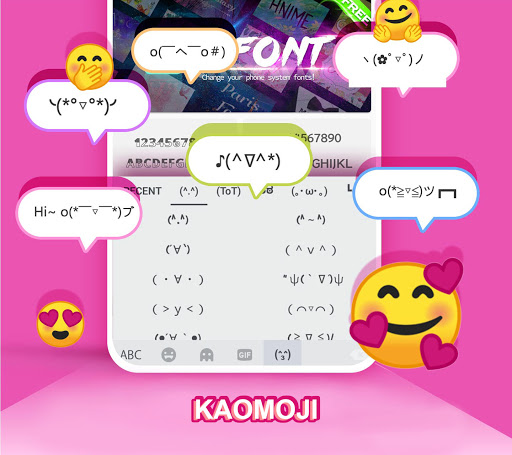
かわいいカオモジ、魅惑的な音、さらには写真のキーボードでさえ、才能のタッチを追加します。 150以上の言語をサポートして世界中の友人とつながり、スタイリッシュなフォントとカスタムデザインを備えたソーシャルメディアで声明を発表します。さらに、whatsappステッカーとGIFを共有して、さらに楽しくしましょう!スライド入力や音声タイピングなどの機能を備えたスマートで高速なタイピングをお楽しみください。 Kikaキーボードは、Androidの究極のキーボードです。今すぐダウンロードして、スタイルを入力してください!

kikaキーボード-ai emojis&Themes機能:

活気のあるキーボードテーマ: LED、透明、重力、アニメーションデザイン、見事なHD壁紙写真キーボードなど、膨大なテーマのコレクションを探索します。新しいテーマが毎日追加され、アニメ、かわいい動物、銀河、愛などをカバーしています。

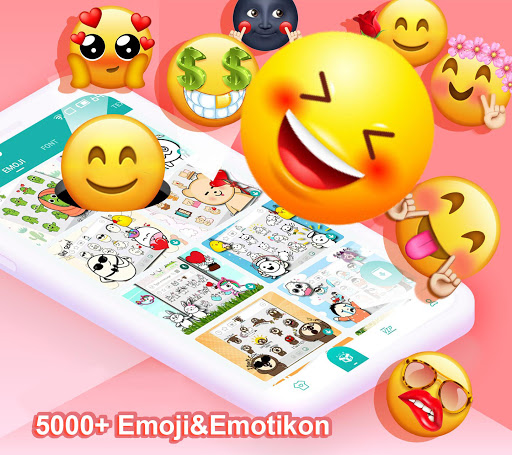
次世代の絵文字キーボード:多種多様な面白い絵文字とテキスト絵文字で絵文字メッセージを簡単に送信できます。革新的な絵文字予測と組み込みの絵文字辞書により、メッセージングは​​より楽しく表現力豊かになります。

クールなフォント:クールなフォントを備えたソーシャルメディアで目立ち、プロファイルとメッセージをカスタマイズします。

カスタムおよび写真キーボード:ギャラリーまたはカメラの写真を背景として、キーボードをパーソナライズします。ボタンの形状、フォント、色、タップエフェクトをカスタマイズします。

よくある質問(FAQ):

互換性: kikaキーボードは、ほとんどのAndroidデバイスと互換性があります。

カスタムテーマ作成:はい、独自の画像を使用してパーソナライズされた写真キーボードを作成します。

音声入力:はい、Kikaキーボードはハンズフリータイピングの音声入力を提供します。

結論:

Kikaキーボード-AI絵文字&テーマには、カラフルなテーマ、新しい絵文字キーボード、クールなフォント、広範なカスタマイズオプションなど、豊富な機能があります。音声入力やスマートタイピングの提案などの革新的な機能により、Kika KeyboardはAndroidユーザーにパーソナライズされた楽しいタイピングエクスペリエンスを提供します。 Kikaキーボードを今すぐダウンロードして、タイピングを変換してください!

Kika Keyboard-AI Emojis、Themes スクリーンショット 0
Kika Keyboard-AI Emojis、Themes スクリーンショット 1
Kika Keyboard-AI Emojis、Themes スクリーンショット 2
Kika Keyboard-AI Emojis、Themes スクリーンショット 3
最新ニュース
Boost Your Monster Hunter Wilds Experience with Exclusive PC Patch by Modder
Fans of Monster Hunter Wilds on PC have reason to celebrate — a passionate modder has released an exclusive, highly anticipated patch that enhances gameplay, performance, and overall immersion for players on the Windows platform.
While Capcom has yet to officially release a PC-specific patch, this community-driven mod introduces several key improvements, including:

Performance Optimization: Reduced stuttering and improved frame rates, especially in dense monster encounters and large-scale map areas.
Enhanced Visuals: Optional texture improvements, higher draw distances, and refined lighting for a more cinematic experience.
Quality-of-Life Tweaks: Customizable UI scaling, faster menu navigation, and improved controller support for better accessibility.
Bug Fixes: Addresses known issues like occasional crashes, input lag, and animation glitches that have plagued the PC release since launch.
Modding Framework Integration: Paves the way for future community mods with built-in compatibility tools and an easy-to-use mod loader.

The patch is currently available via trusted modding platforms like Nexus Mods and ModDB, with detailed installation guides and backup instructions provided by the developer.
While official support for mods remains limited, the modder stresses that this patch is designed to complement, not replace, the base game. Players are encouraged to back up their game files before installation.
This release marks a strong example of the PC gaming community stepping in to elevate the experience when official updates are slow or limited. Fans are already praising the patch for making Monster Hunter Wilds more polished and enjoyable on PC.
👉 Pro Tip: Always download mods from verified sources and check compatibility with your game version to avoid issues.
Stay tuned for more updates — the modding community is just getting started.
#MonsterHunterWilds #PCGaming #ModPatch #MonsterHunterMod #GamingNews #PCGamingCommunity

Boost Your Monster Hunter Wilds Experience with Exclusive PC Patch by Modder Fans of Monster Hunter Wilds on PC have reason to celebrate — a passionate modder has released an exclusive, highly anticipated patch that enhances gameplay, performance, and overall immersion for players on the Windows platform. While Capcom has yet to officially release a PC-specific patch, this community-driven mod introduces several key improvements, including: Performance Optimization: Reduced stuttering and improved frame rates, especially in dense monster encounters and large-scale map areas. Enhanced Visuals: Optional texture improvements, higher draw distances, and refined lighting for a more cinematic experience. Quality-of-Life Tweaks: Customizable UI scaling, faster menu navigation, and improved controller support for better accessibility. Bug Fixes: Addresses known issues like occasional crashes, input lag, and animation glitches that have plagued the PC release since launch. Modding Framework Integration: Paves the way for future community mods with built-in compatibility tools and an easy-to-use mod loader. The patch is currently available via trusted modding platforms like Nexus Mods and ModDB, with detailed installation guides and backup instructions provided by the developer. While official support for mods remains limited, the modder stresses that this patch is designed to complement, not replace, the base game. Players are encouraged to back up their game files before installation. This release marks a strong example of the PC gaming community stepping in to elevate the experience when official updates are slow or limited. Fans are already praising the patch for making Monster Hunter Wilds more polished and enjoyable on PC. 👉 Pro Tip: Always download mods from verified sources and check compatibility with your game version to avoid issues. Stay tuned for more updates — the modding community is just getting started. #MonsterHunterWilds #PCGaming #ModPatch #MonsterHunterMod #GamingNews #PCGamingCommunity

バイオハザードRE:2、iPhone 15 Proと16 Proで正式リリース

バイオハザードRE:2、iPhone 15 Proと16 Proで正式リリース