

WhatsApp Business
Категория : СвязьВерсия: 2.24.12.78
Размер:60.17 MBОперационные системы : Android 5.0 or higher required
Разработчик:WhatsApp LLC
 Скачать
 WhatsApp Business — официальное бизнес-приложение WhatsApp. Полностью отдельный от стандартного WhatsApp, он позволяет одновременно использовать личный аккаунт даже на одном устройстве с двумя SIM-картами.
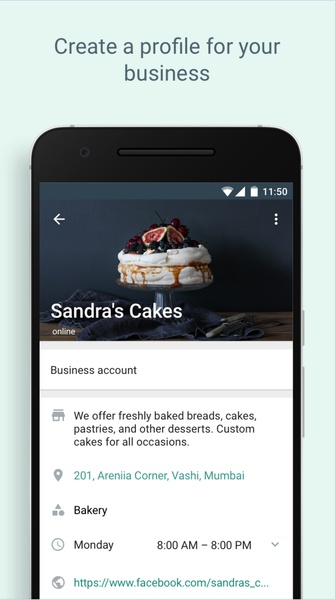
Настройте профиль своей компании
Чтобы создать профиль WhatsApp Business, используйте номер своего рабочего телефона (не связанный с какой-либо существующей учетной записью WhatsApp). Добавьте название и логотип вашей компании, учитывая круглый формат изображения профиля для оптимального брендинга.
Добавьте всю информацию о своей компании
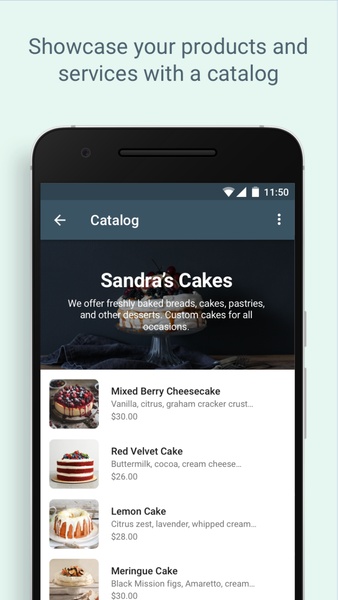
Комплексная деловая информация улучшает общение с клиентами. Укажите часы работы, адрес веб-сайта, физический адрес (если применимо) и другую соответствующую информацию. Упреждающее предоставление информации сводит к минимуму повторяющиеся ответы. Как и в Google Мой бизнес, вы даже можете добавить каталог товаров.
Автоматизируйте сообщения, чтобы улучшить качество обслуживания
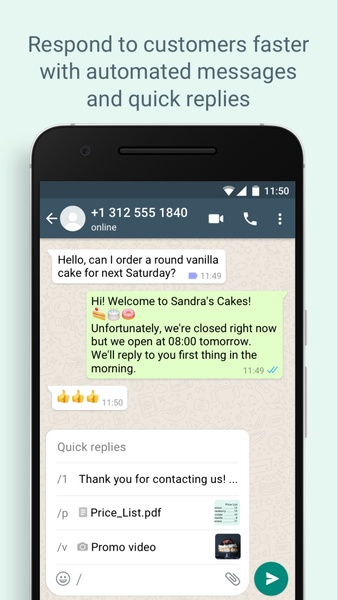
Ключевым преимуществомWhatsApp Business являются функции автоматизации. Настройте автоматические приветственные сообщения и ответы в нерабочее время, чтобы улучшить качество обслуживания клиентов и повысить эффективность.
Наслаждайтесь всеми функциями WhatsApp и многим другим
Построенный на той же платформе, что и WhatsApp, WhatsApp Business предлагает все стандартные функции: фотографии, видео, аудиосообщения, стикеры, обновления статуса, блокировку, групповые чаты и видеозвонки.
Получите лучший клиент обмена сообщениями для профессионалов
WhatsApp Business идеально подходит для малого и среднего бизнеса, которому требуется эффективное управление коммуникациями. Наслаждайтесь удобным доступом из любого места, включая версию браузера для ПК и Mac.
Требования (последняя версия)
Требуется Android 5.0 или выше
Часто задаваемые вопросы
- Бесплатен ли WhatsApp Business? Да, WhatsApp Business бесплатен. Он предлагает дополнительные услуги для улучшения общения между бизнесом и клиентами.
- В чем разница между WhatsApp и WhatsApp Business? WhatsApp Business отображает деловую информацию и каталоги для оптимизации общения.
- Что я не могу делать с WhatsApp Business? Вы не можете объединять личный и рабочий аккаунты WhatsApp. WhatsApp рекомендует использовать отдельную SIM-карту для вашего бизнес-аккаунта.
- Сколько стоит WhatsApp Business? WhatsApp Business бесплатно.
- Как мне это сделать? настроить WhatsApp Business? Перейдите в «Настройки», выберите «WhatsApp Business Условия» и нажмите «Принять». Затем заполните данные о своей компании и настройте свой профиль.
- Как использовать WhatsApp Business API? WhatsApp Business API доступен после подписки на план через выбранный партнер. Стоимость варьируется в зависимости от выбранного плана.
- Каков размер файла WhatsApp Business APK? Размер файла WhatsApp Business APK составляет примерно 40 МБ.



Flappy Bird возвращается в магазин Epic Games
Мировой чемпионат Pokémon 2024 представляет Тёмные и Светлые версии
- Арад Ньюс: Последний отчет о Дерн и Файтер 3 дней назад
- Хонкай: Нексус Анима для соединения двух миров Хонкай 6 дней назад
- Эксклюзивы Switch 2 обнаружены в комнате Дельтарун 1 недель назад
- 看起来你可能输入了一段文字,但内容不完整或需要进一步说明。你能提供更多细节吗?比如你想问的问题、需要帮助的主题,或者你希望我如何协助你?我会尽力为你解答! 😊 1 недель назад
- Dead Rise: люди горят в первые пять минут воскрешения — IGN Live 2025 2 недель назад
- It seems like your message might be incomplete or cut off. Could you please clarify what you're asking for? Whether it's help with a topic, a question, or something else, I'm here to assist! 😊 2 недель назад
- As of now, Nintendo Switch 2 has not been officially announced by Nintendo. The latest model available is the Nintendo Switch OLED, and there is no confirmed release date or details about a "Switch 2" as of mid-2024. However, if you're looking for the best power banks to use with your current Nintendo Switch (or future Switch 2, if released), here are the top recommendations based on compatibility, performance, and user feedback: ✅ Best Power Banks for Nintendo Switch (and Future Switch 2) 1. Anker PowerCore 26800mAh (20W PD) Capacity: 26,800mAh Output: 20W USB-C PD (supports fast charging) Why it’s great: High capacity for long gaming sessions (can charge Switch 2–3 times). USB-C PD output matches Switch’s charging specs. Compact and durable with Anker’s trusted build quality. Can charge Switch while on the go (even in handheld mode). Best for: Long trips, extended gameplay. 🔌 Note: Use a USB-C to USB-C cable (included or compatible) for best results. 2. RAVPower 20000mAh 20W USB-C PD Power Bank Capacity: 20,000mAh Output: 20W USB-C PD Why it’s great: Slim, lightweight, and travel-friendly. Fast charging (up to 10W–20W, ideal for Switch). Built-in LED battery indicator. Affordable and reliable. Best for: Daily commuters, backpackers, and casual gamers. 3. Belkin 20W USB-C PD Power Bank (10000mAh) Capacity: 10,000mAh Output: 20W USB-C PD Why it’s great: Compact and premium design. Apple and Nintendo Switch certified for safe charging. Great for on-the-go use (fits in small bags). Best for: Users who want a small, reliable, and brand-name power bank. 4. Xiaomi Mi 20000mAh 20W USB-C Power Bank Capacity: 20,000mAh Output: 20W USB-C PD Why it’s great: Excellent value for money. Fast charging and efficient power delivery. Durable build and good heat management. Best for: Budget-conscious gamers who still want performance. 🔌 Important Tips for Charging Nintendo Switch: Use a USB-C to USB-C cable (official or certified). Ensure the power bank supports USB Power Delivery (PD) at 20W or higher. Avoid cheap, non-certified power banks — they may not charge properly or could damage your Switch. The Switch charges best at 5V/3A (15W) or 9V/2.2A (20W) — PD power banks are ideal. ❓ What About Nintendo Switch 2? If/when Nintendo Switch 2 is released, it’s expected to: Use USB-C for charging (confirmed via leaks and rumors). Possibly support faster charging (e.g., 20W+ PD). Maintain similar power draw (~10–15W), so current PD power banks will still work. ✅ Bottom Line: Any 20W USB-C PD power bank will work perfectly with the current Switch and will likely be compatible with a future Switch 2. 🏆 Final Recommendation: 👉 Best Overall: Anker PowerCore 26800mAh 20W PD 👉 Best Budget Pick: RAVPower 20000mAh 20W PD 👉 Best Compact Option: Belkin 20W USB-C PD (10000mAh) Stay updated by checking official Nintendo news or trusted tech sites like Nintendo Life, The Verge, or IGN for any official Switch 2 announcements. Let me know if you want a power bank with a built-in battery case or a charging dock! 🎮🔋 2 недель назад
- As of now, the 2025 NCAA Men's Basketball Championship Final Four teams have not been determined, as the tournament has not yet taken place. The NCAA Tournament typically begins in March 2025, with the Final Four scheduled for April 2025, and the national championship game set for April 7, 2025, at the Mercedes-Benz Stadium in Atlanta, Georgia. The teams that will make it to the 2025 Final Four will be the winners of the East, Midwest, South, and West regions of the tournament. These teams will be selected based on their performance during the regular season and in the NCAA Tournament. So, while the 2025 NCAA Tournament finalists are not yet named, they will be officially announced after the Final Four games in April 2025. Be sure to check the official NCAA website or trusted sports news sources for updates as the tournament progresses. 2 недель назад
- As of now, there is no official confirmation from Netflix or the creators of Black Mirror that Season 7 will include a new game titled "Thronglets." The idea of a Black Mirror game, especially one with such a name, appears to be speculative or possibly a fan-made concept. Black Mirror has explored interactive storytelling in the past—most notably with Black Mirror: Bandersnatch (2018), an interactive film that allowed viewers to make choices that influenced the narrative. While Netflix has experimented with interactive content, they have not officially announced a new game titled "Thronglets" tied to a seventh season of Black Mirror. It’s possible that "Thronglets" is a fictional or humorous fan creation, or a misinterpretation of a teaser or promotional material. For the latest and most accurate updates, always refer to official sources such as Netflix’s press releases or the show’s social media channels. Stay tuned for any official announcements, but as of now, "Thronglets" is not a verified part of Black Mirror Season 7. 2 недель назад
-

Модная жизнь / 24.4.1 / by Calisteniapp, S.L. / 69.34M
Скачать -

Коммерческое управление / v1.0 / by xifa console / 2.95M
Скачать -

Модная жизнь / 0.105 / by Veicoli Srl / 4.80M
Скачать -

Инструменты / v1.1.9 / by nikiisoku / 141.53M
Скачать -

Персонализация / 1.3.2 / 229.15M
Скачать -

Инструменты / 2.2.8 / by Gspace Team / 15 MB
Скачать -

Модная жизнь / v1.0 / by MNA Team / 264.80M
Скачать -
Персонализация / v5.3.0 / by Free Action Games Lab / 93.63M
Скачать
-
 10 лучших команд в Marvel Strike Force (2025)
-
 Square Enix создает новую политику для защиты сотрудников от токсичных фанатов
-
 Празднуйте 7 -й годовщину: Решите загадку в Гарри Поттере: загадку Хогвартса!
-
 Как исправить Marvel конкурентов, компилирующих шейдеры медленно запуска
-
 Кажется, мы можем забыть о явных сексуальных сценах в Inzoi
-
 "ESO расширения и DLC: полное руководство по заказу"